Workflow Guide
Transform Your Workflow with Automation
Unlock the potential of your time and resources with strategic workflow automation.
Operational Friction
Busy executives often face operational friction due to scattered tasks, overwhelming information, and inefficient processes. These challenges can lead to:
- Time Wastage: Executives spend hours on repetitive tasks instead of strategic decision-making.
- Information Overload: With numerous sources of information, it's hard to focus on what truly matters.
- Lack of Coordination: Disjointed workflows can result in missed opportunities and delayed projects.
These issues not only hinder productivity but also impact overall business performance.
How the Workflow Operates
The solution lies in implementing a structured workflow automation system that integrates various tasks into a cohesive process. Here’s how it works:
- Centralized Content Reservoirs: By utilizing content reservoirs, executives can curate and manage relevant information seamlessly, ensuring that they have access to the most pertinent data at their fingertips.
- Automated Discovery: The system automatically collects content from multiple sources, including industry news, social media, and internal documents, reducing the time spent on manual searches.
- Strategic Content Generation: With AI-driven insights, executives can generate strategic outlines and content that align with their business goals, ensuring that every piece of information serves a purpose.
- Performance Analytics: Continuous monitoring and analytics allow executives to measure the effectiveness of their workflows, enabling data-driven adjustments and improvements.
Step-by-Step Workflow
Implementing workflow automation involves a systematic approach. Here’s a breakdown of the steps:
- 1
Step 1: Create Your Content Reservoir
Access the BlackOps Center dashboard and set up your first content reservoir tailored to your business needs.
Outcome: A curated knowledge base that continuously collects relevant content.
- 2
Step 2: Enable Content Discovery
Activate automatic content discovery from various sources to keep your reservoir updated.
Outcome: Real-time access to the latest industry insights and trends.
- 3
Step 3: Build Your Content Strategy
Link your reservoir to strategic objectives and define your target audience for focused content creation.
Outcome: A clear roadmap for content that aligns with business goals.
- 4
Step 4: Generate Context-Aware Content
Utilize AI to create detailed content outlines and generate high-quality content from your reservoir.
Outcome: Strategically crafted content that enhances executive communication and decision-making.
Capabilities That Power the Workflow
The following features are essential for enabling efficient workflow automation:
Automatically gather content from various sources to keep your knowledge base relevant.
Leverage AI to generate strategic outlines and content that align with your business objectives.
Track the effectiveness of your workflows with detailed analytics and performance metrics.
Tailor your content reservoirs to fit specific themes and expertise areas, ensuring focused content creation.
Enablement & Governance
To ensure successful implementation of workflow automation, consider the following:
- Training Sessions: Provide comprehensive training for executives and their teams on using the automation tools effectively.
- Governance Policies: Establish clear guidelines for content creation and management to maintain quality and consistency.
- Regular Reviews: Schedule periodic reviews of the workflow processes to identify areas for improvement and optimization.
Metrics That Matter
Key performance indicators (KPIs) to monitor the success of your workflow automation include:
- Time Saved: Measure the reduction in hours spent on manual tasks.
- Content Engagement: Analyze engagement metrics for generated content to assess its impact.
- ROI on Automation: Evaluate the return on investment from implementing workflow automation tools.
- User Satisfaction: Gather feedback from executives on the effectiveness of the new processes.
Frequently Asked Questions
How long does this workflow take?
The implementation time varies based on the complexity of your existing processes, but initial setup can be completed within a few weeks.
Can this integrate with existing tools?
Yes, BlackOps Center is designed to integrate seamlessly with various business tools and platforms.
What training is required?
Training sessions will be provided to ensure all users are comfortable with the new system and its functionalities.
Create your own Brain, then a site where you share what you know
What could you talk about for an hour?
Speak it, type it, or upload it. We interview you on your specifics, structure what you know into your own Brain, and draft your first post from it — in your voice, on your own site. No credit card, no billing screens.
No email until you've seen your Brain. Human-authored. AI-refined.
Featured Articles
Insights on commerce development, AI workflows, and engineering leadership
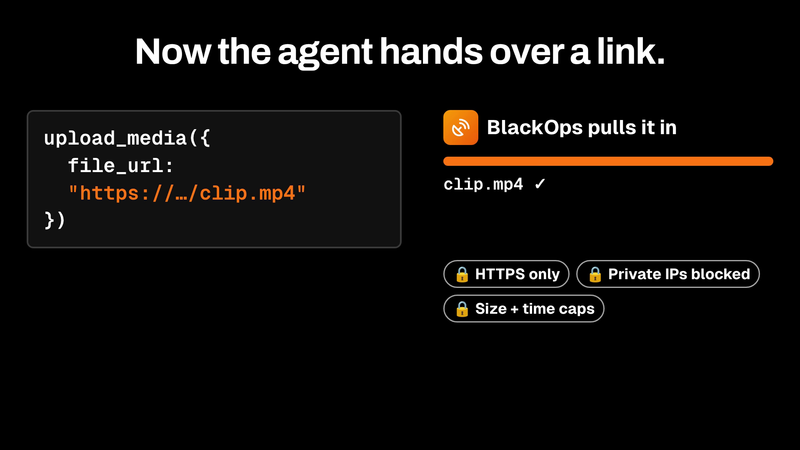
upload_media now pulls files in by URL
Agents hand BlackOps a link, get back an asset ID, and attach it. No human step.
upload_media now takes a file_url. BlackOps fetches the file server-side behind SSRF guards and returns an asset ID that attaches straight to a tweet or post.

I kept forgetting my newsletter. Now BlackOps sends it and tells my readers why.
Newsletter Autopilot: miss your own deadline and BlackOps writes the issue from what you published, in its own voice.
Set a schedule. If you miss it, BlackOps writes the issue from what you published, tells your readers it's covering for you, and sends it. Your own send always wins.

Your Obsidian Daily Notes Can Finally Talk Back
You've kept daily notes for years. Now BlackOps connects them to your calendar, your brains, and your AI chat, and writes them on schedule.
You've been creating Obsidian daily notes for years. Now BlackOps writes them on your schedule, connects them to your calendar and brains, and lets you talk to them from any AI chat.