Your Obsidian Daily Notes Can Finally Talk Back
You've kept daily notes for years. Now BlackOps connects them to your calendar, your brains, and your AI chat, and writes them on schedule.

You've been writing Obsidian daily notes for years. A heading for the date. A list of meetings you copied out of your calendar. A few todos you forgot to move from yesterday. A log section you meant to fill in.
The note was always yours. It just never knew anything.
Now it does. BlackOps Center writes your daily note on a schedule, straight into your vault, from your calendar, your queued todos, and your brains (BlackOps knowledge bases, one per project or area of your life). And because it lives in BlackOps, you can talk to it from any AI chat you already use.
The Setup You Already Have
If you're serious about daily notes, you probably built your own system. A Templater template. Periodic Notes to open today's file. A Dataview query or two to pull in recent notes. The Tasks plugin, or a habit, to roll unfinished todos forward. And every morning, meetings copied in from your calendar by hand.
I went a step further. I ran my daily note from a scheduled Claude Code script for months. Every morning it read my calendar, scanned the last week of vault files, and wrote a note.
It worked. Until it didn't.
Every one of those setups has the same ceiling. It only sees files. It decides what's new by looking at file dates and folder names. It has no idea which project a note belongs to, whether a task is still open, or what changed since yesterday. So it guesses.
BlackOps doesn't have to guess. It knows which brain every note belongs to, when it changed, and what's still open. So the daily note answers the only two questions that matter in the morning: what needs me today, and what changed in the things I care about since yesterday.
That's the whole reason this lives in BlackOps and not in another plugin.
What Lands in Your Vault
Here's a trimmed example of a work note. Generic content, real shape.
## Today's Focus
Three meetings, two of them back to back after lunch. The proposal
has been waiting two days, so clear it before the front-end sync.
One brain task is past due.

## Today's Meetings
| Time | Meeting | Join |
|-|-|-|
| 9:30 AM | Defect triage | [Join](https://example.com/meet) |
| 1:00 PM | Front-end sync | [Join](https://example.com/meet) |
| 1:30 PM | Project Apollo review (tentative) | |

> [!warning] Schedule Conflicts
> Front-end sync overlaps Project Apollo review.

## To-dos
- [ ] Send the proposal (carried 2 days) ^di-7f3a2c

## Waiting on you
- **Project Apollo:** Confirm the release checklist (past due)

## New in your brains
### Project Apollo
- [[QA plan v2]] (updated)
- [[Decision: move launch to Tuesday]] (new)

## Daily Log
Four sources feed that note.
Your calendar. Paste a private ICS link from Outlook, Google Calendar, or iCloud. No OAuth, no permissions dance. You get a meetings table with times in your timezone, join links, tentative and declined flags, and a conflicts warning when two things overlap.
The daily queue. Anything you tell your AI assistant to put in tomorrow's note. Todos, links to notes, reminders. Unfinished todos carry forward and tell you how many days they've been waiting. That number is a little rude. It's supposed to be.
Your brains. The note pulls the open tasks your brains are waiting on you for, and every note added or changed in them since your previous daily note. Nothing new slips past you. A Monday note covers the weekend.
Today's Focus. An optional short summary at the top, built only from the note's own data. It doesn't invent anything. It reads what's already in the note and tells you where to start. Turn it off if you'd rather not.
Talk to It
This is the part that changed how I work.
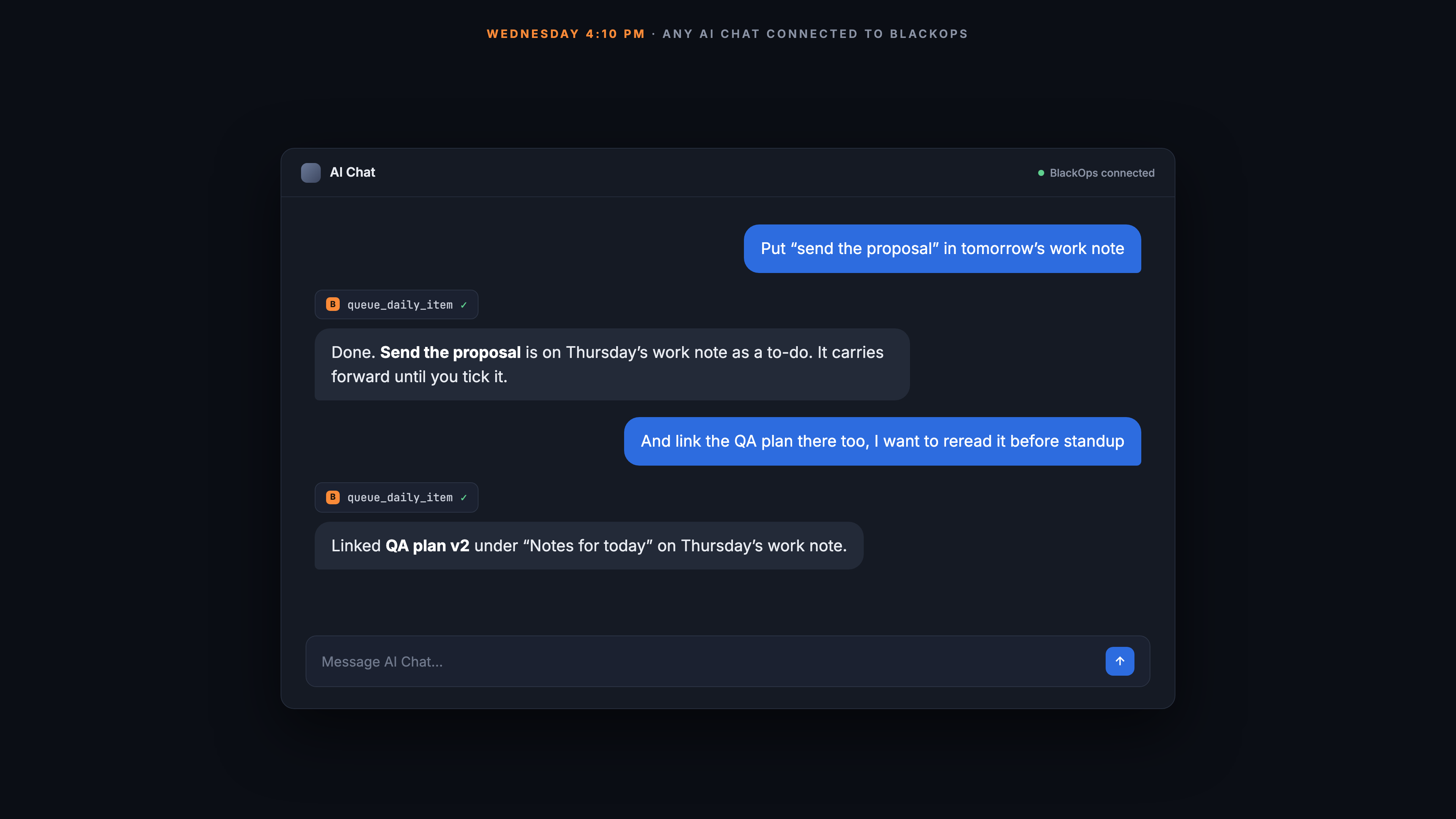
Your daily note is now something you can talk to. From Claude, ChatGPT, or any AI assistant connected to BlackOps through MCP. Here's a Wednesday afternoon:
And here's Thursday morning, when you open Obsidian:
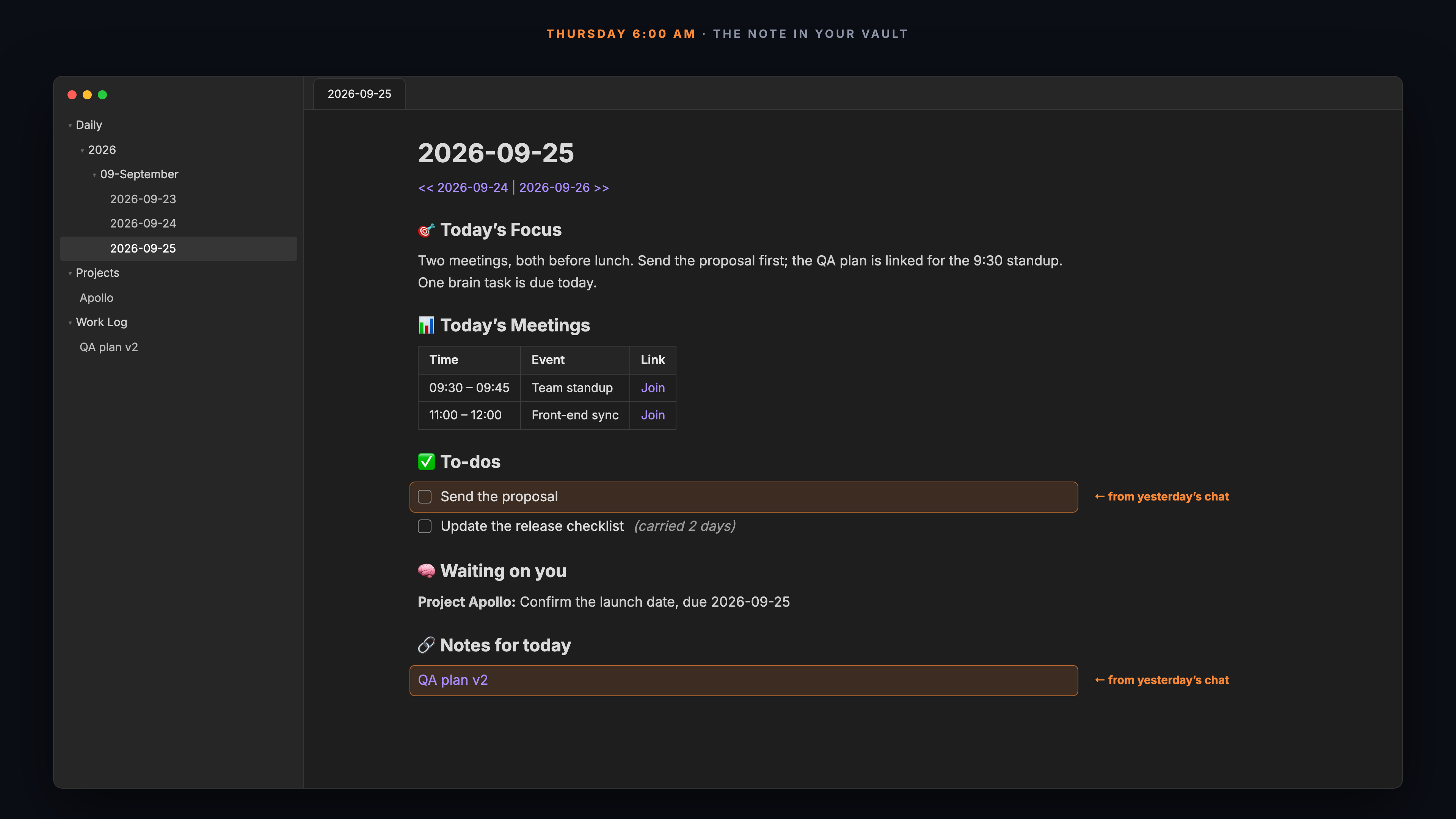
You never opened Thursday's note on Wednesday. You didn't hunt for the right file or remember to copy the todo forward. The idea landed in the right note on the right day while you were still thinking about it.
It works for questions too. Ask "what's on my list for tomorrow?" and you get the answer without changing anything. Say "mark that done" and it's closed.
And it goes both ways. Every todo ends with a short block ID, the ^di- at the end of the line. Reading view hides it. It's how a ticked checkbox finds its way back: tick the box in Obsidian and BlackOps marks the item done, so it stops carrying forward. You don't have to pick a side. Check things off wherever you happen to be.
Try it on your own vault. Start your 14-day trial. No credit card.
As Many Notes as Your Life Has
One daily note was never enough for me. Work and personal don't belong in the same file.
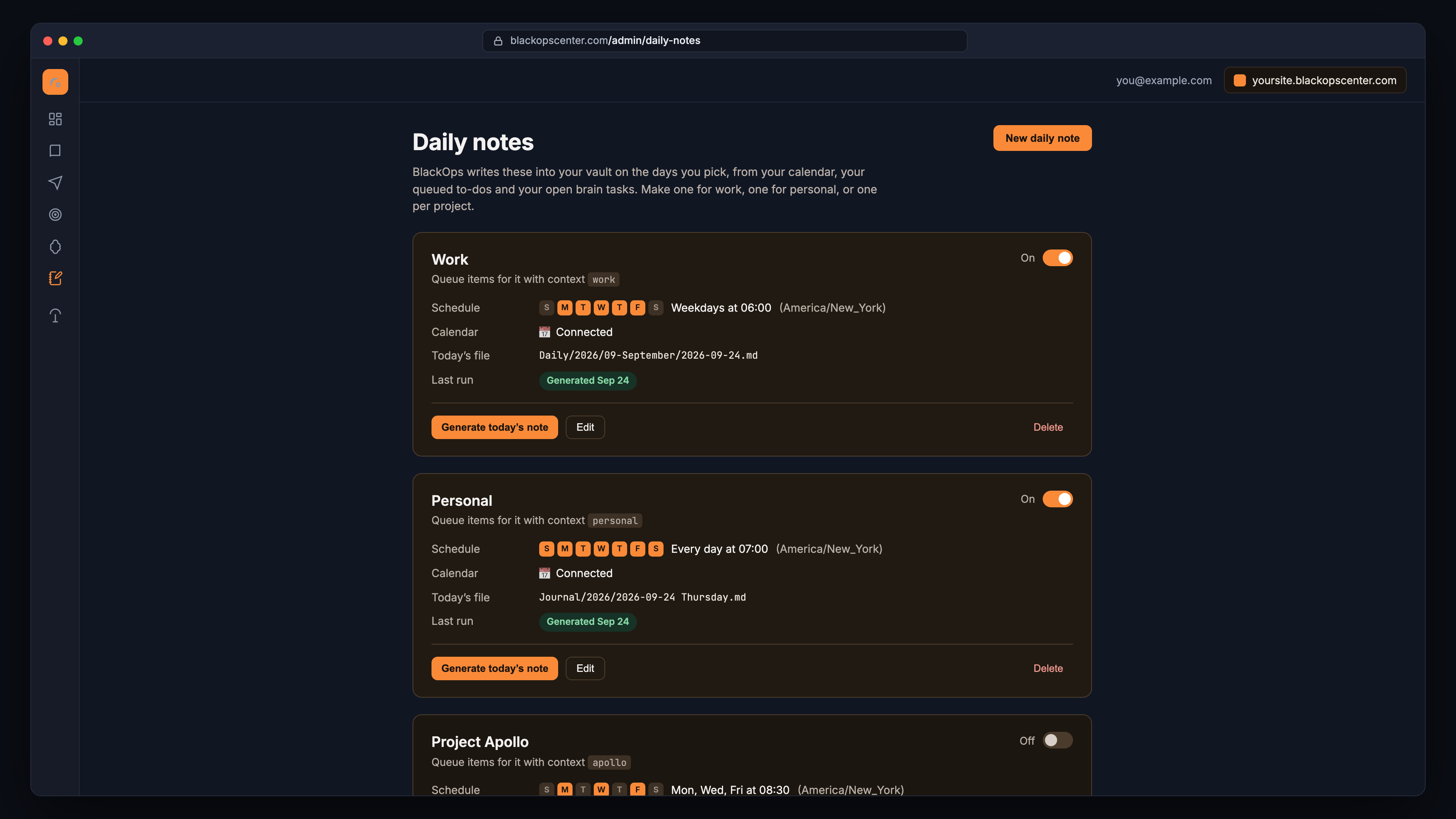
So you can have as many as you want. One for work. One for personal. One per project. Each has its own schedule, its own calendar, its own brains, and its own place in your vault.
Set them up in Admin → Daily Notes. It's a settings page. No config files, no YAML, no cron syntax.
Open one and everything about it is on a single page.
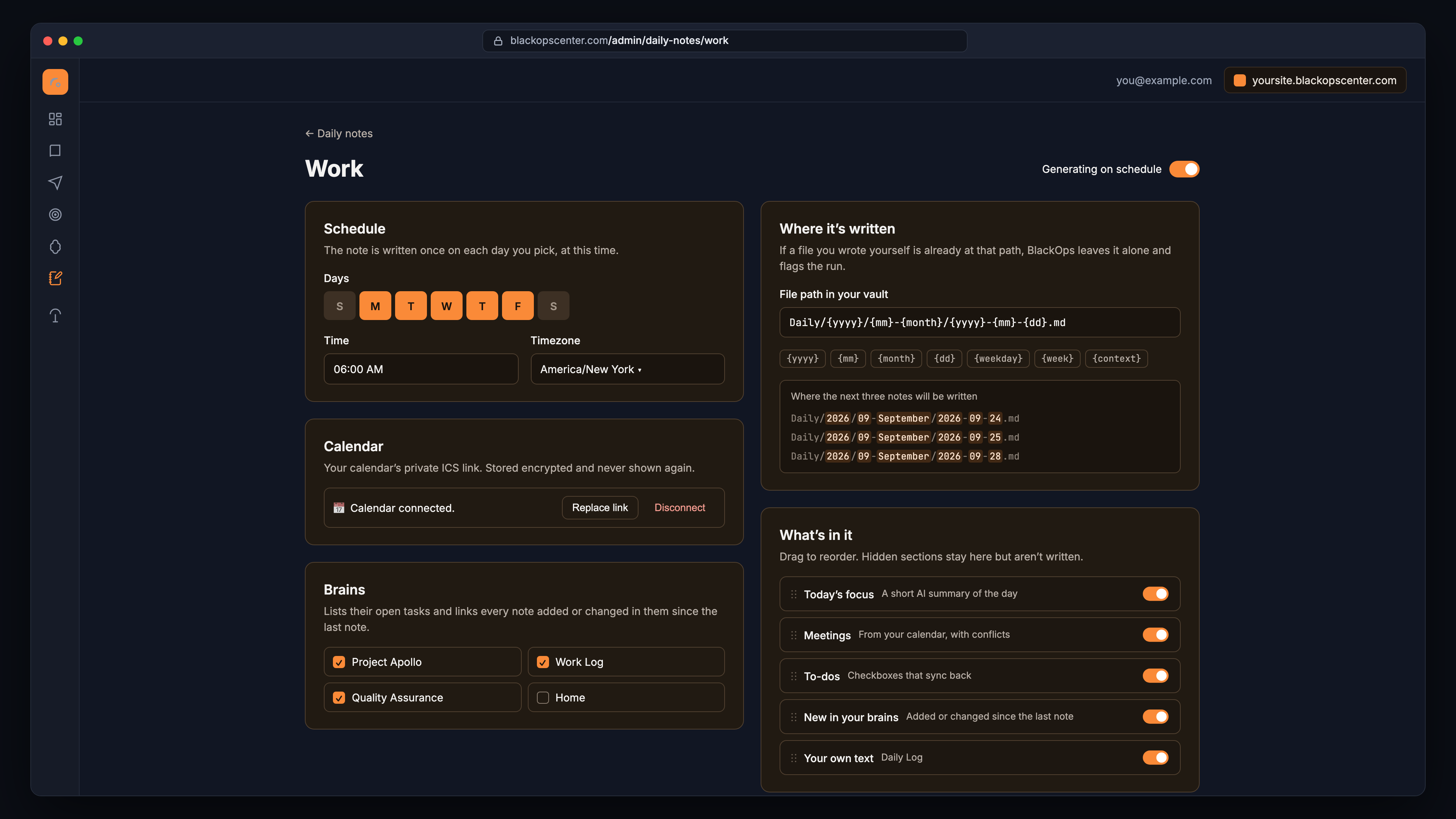
- Schedule. Pick the days of the week, the time, and your timezone.
- Where it goes. File paths use date tokens, so notes land where your vault already keeps them. Something like
Daily/{yyyy}/{mm}-{month}/{yyyy}-{mm}-{dd}.md. - What's in it. Drag sections to reorder them. Hide the ones you don't want. Add your own markdown, like Dataview queries or a log heading, and it goes into every note.
Keep What You Already Built
You don't throw away your setup. You bring it with you.
Your Dataview blocks and headings become sections in the note's settings, and they're copied into every note. For a query that depends on the note's date, use this.file.day instead of a fixed date, like WHERE created > this.file.day - dur(1 day).
And you don't have to switch overnight. Point your first BlackOps note at a separate folder and run it next to your current setup for a week. Compare them side by side. When the BlackOps note is the one you'd rather read, turn off the old template and change the path to the folder you've always used.
One rule makes that safe: BlackOps never overwrites a file you wrote yourself. If you already have a note at that path, it stays untouched and the run is flagged. Nothing you wrote gets clobbered.
Why This Matters
Daily notes were always a good habit with a bad input problem. You spent the first ten minutes of the day assembling context by hand, and the note was only as good as your memory at 8 AM.
Now the context shows up on its own. Your meetings. The todo you've been dodging for two days. The decision someone added to a project brain over the weekend. And when an idea hits in the middle of a conversation, you say "put it in tomorrow's note" and move on.
I built this to replace my own script. It already has.
What You Need
One requirement up front: BlackOps writes into your vault through GitHub.
- Your vault in a GitHub repo. If it's already there, you're set. If your vault only syncs through Obsidian Sync or iCloud, add a GitHub repo first. The free Obsidian Git community plugin pushes your vault to one. Then you install the BlackOps GitHub App on that repo, and it only touches the repos and folders you grant. Connecting a vault walks through it.
- A calendar link, if you want meetings. The private ICS address from Outlook, Google Calendar, or iCloud. Skip it and hide the meetings section.
- An AI chat connected to BlackOps, if you want to talk to it. Optional. The note gets written on schedule either way.
Set Up Your First Daily Note
Start with one. Work is the obvious choice. Pick your weekdays, paste your calendar link, point it at your project brains, and click Generate today's note to see a real one today.
Start your 14-day trial. No credit card.
Then keep these handy:
- Daily Notes Playbook: what a day with it looks like, what to say to your assistant, and how to move off a script or plugin.
- Daily Notes docs: schedules, path tokens, templates, and connecting your calendar.
- Daily Feed docs: how to queue todos, links, and reminders from your AI assistant.
Human-authored. AI-refined.
Related Posts

Tonight was my first time in Grok Bot. It already knew the work.
Tonight was my first time in Grok Bot. BlackOps MCP already had my voice and my work. This post existed a few minutes later.

A Screenshot Shouldn't Cost You 500,000 Tokens
Pasting a screenshot into your AI to file it in your media library used to torch your context window. We shipped Image Upload so the bytes never ride through the model again.

Note Taxonomy: your tag vocabulary, your folders, your rules
BlackOps now keeps AI-written notes aligned with your conventions. Define your tags, set folder routing rules, and let assistants land notes in the right place.