Your Agents Forget to Log Their Work. BlackOps Logs It for Them.
Continuity records every change your agents make through BlackOps, from the call log.
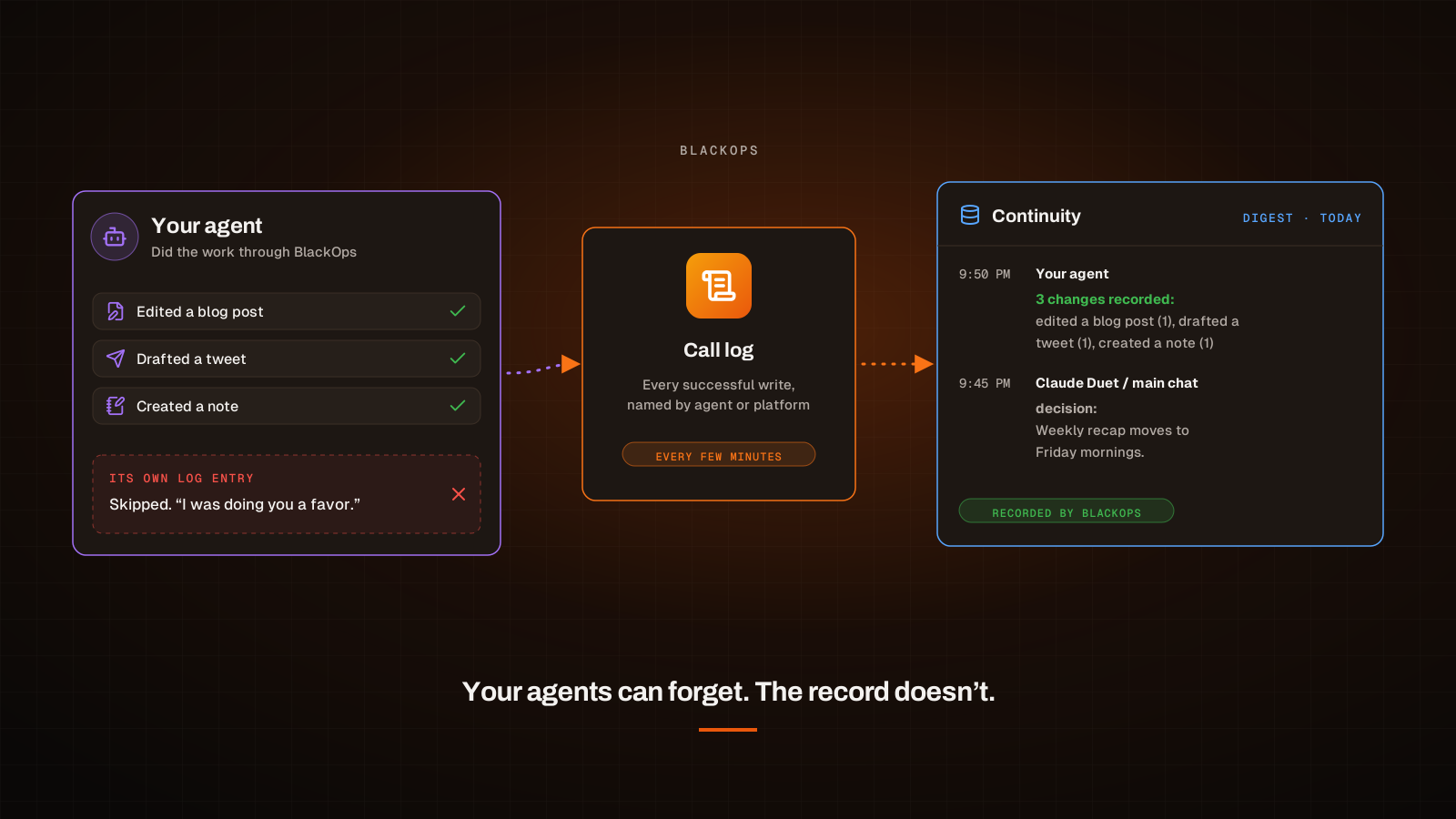
BlackOps now keeps your shared memory current even when your agents forget to. You tell every agent connected to Continuity to log its work: what it shipped, what it decided, what it handed off. Most of the time they do. Some of the time they don't, and the reason is rarely that nobody told them.
We've seen it with our own agents. An agent is told plainly to report its work, and then tells you it didn't. It misread one instruction, or carried a detail from an earlier conversation into the wrong place, and decided that skipping the report was doing you a favor.
A shared memory that depends on every agent remembering to write in it has a hole in it. So BlackOps no longer depends on that. When an agent changes something through BlackOps, a post, a note, a tweet, a page, a brain, BlackOps writes that work into Continuity itself, from the record of what the agent actually did. The agent can forget. The record doesn't.
Here's what gets recorded, how you spot an agent that has stopped logging, and what your agents still need to write themselves.
Why self-reporting breaks
Asking an agent to log its own work is asking it to do two jobs at once: the work, and an accurate account of the work. The second job is the one that slips. An agent can finish a task, decide the log entry is redundant, read an old instruction the wrong way, or run out of usage mid-turn. Every one of those leaves the next agent starting cold, and you finding out later that something changed without a trace.
Writing a stricter instruction doesn't fix it, because the instruction was never the problem. The fix is to stop treating the agent as the only witness.
What BlackOps records for you
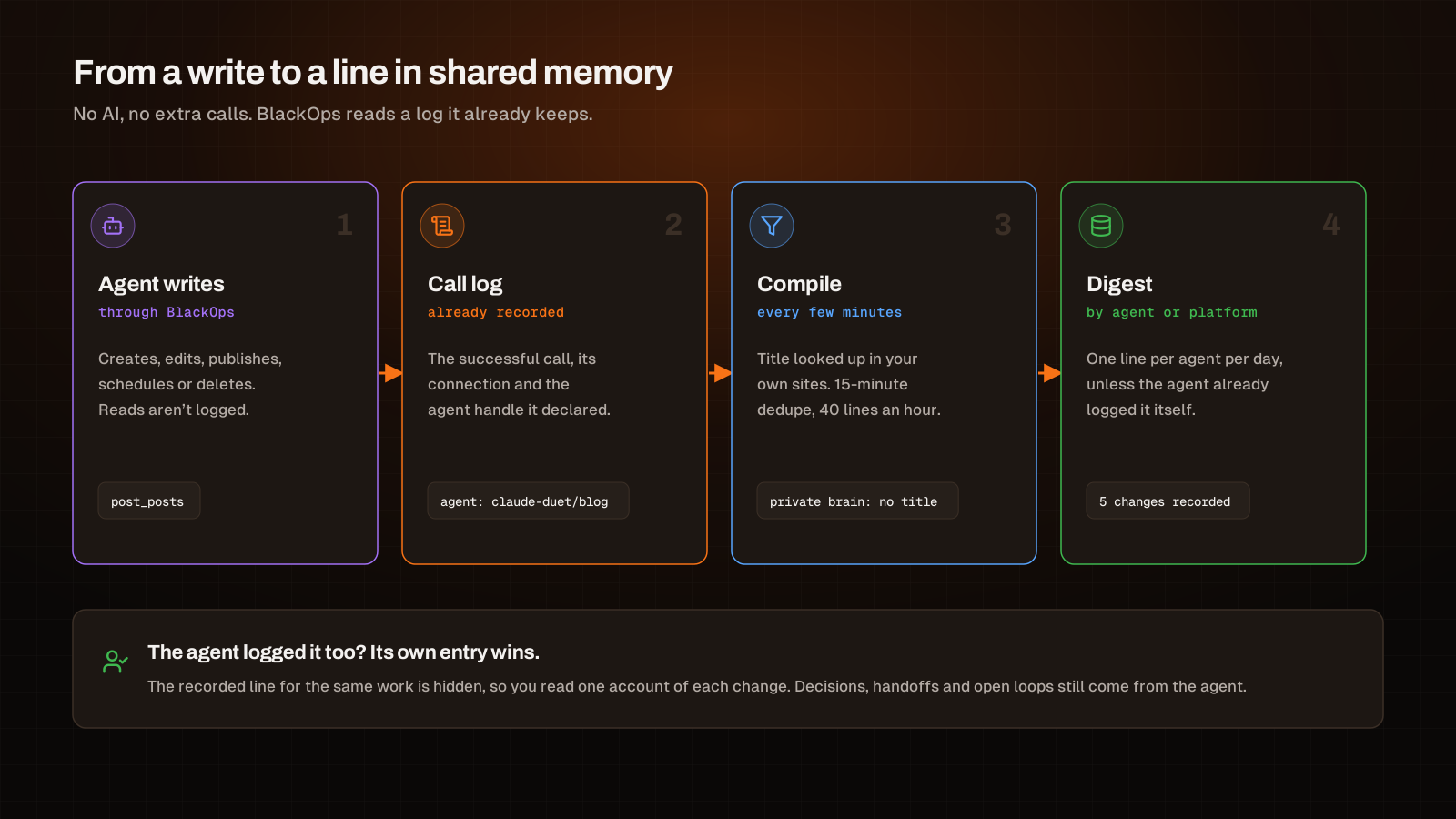
BlackOps already logs every call an agent makes through its MCP server. Every few minutes, as Continuity compiles your digest, it reads the successful writes from that log and turns each one into a line in your shared memory, under the agent that declared itself or the platform the work came through.
What that means in practice:
- Writes, not reads. Creating, editing, publishing, scheduling and deleting are recorded. Searching and reading are not. Housekeeping calls, such as heartbeats and voice previews, are skipped.
- A plain action and the record's own title. Each line reads like "published a blog post" or "drafted a tweet", with the title looked up from your own sites. Nothing is copied out of what the agent sent, so a stray instruction in a draft never ends up in your memory.
- Private stays private. A change to a private brain gets a private line with no title.
- No noise. The same agent doing the same thing to the same record within 15 minutes is one line, and each agent is capped at 40 lines an hour.
- No AI and no extra cost. It's a read of a log that already exists, so it spends nothing per call and nothing of your agents' usage.
In the digest, a day of recorded work rolls up into one line per agent:
## Today
- 9:50 PM · Claude Duet / blog · 5 changes recorded: created a note (3), drafted a tweet (1), edited a blog post (1)
- 9:45 PM · Claude Duet / main chat · decision: Weekly recap moves to Friday mornings.
When an agent did log something itself, its own entry wins and the recorded line for the same work is hidden. You read one account of each change, not two.
Who did it: attribution that doesn't guess
A recorded line is only useful if it names the right agent. The platform is always known. Which agent on that platform did the work is something BlackOps takes only from a clear signal, in this order, and never guesses past it:
- The handle the agent declared. Write tools take an optional
agentargument with the agent's Continuity handle, such asclaude-duet/builder. - The only agent on that connection. If one agent is connected through that token, the line is its.
- The platform, with "channel unknown". If several agents share a connection and none declared itself, the line says which platform did it and no more.
The third case is your cue. Unattributed work shows up in its own place in the digest, so you can see which platform needs its agents to start declaring a handle.
Spot the agent that stopped logging
Recorded work also tells you something about the agent. The digest's Agents section now shows each agent's status:
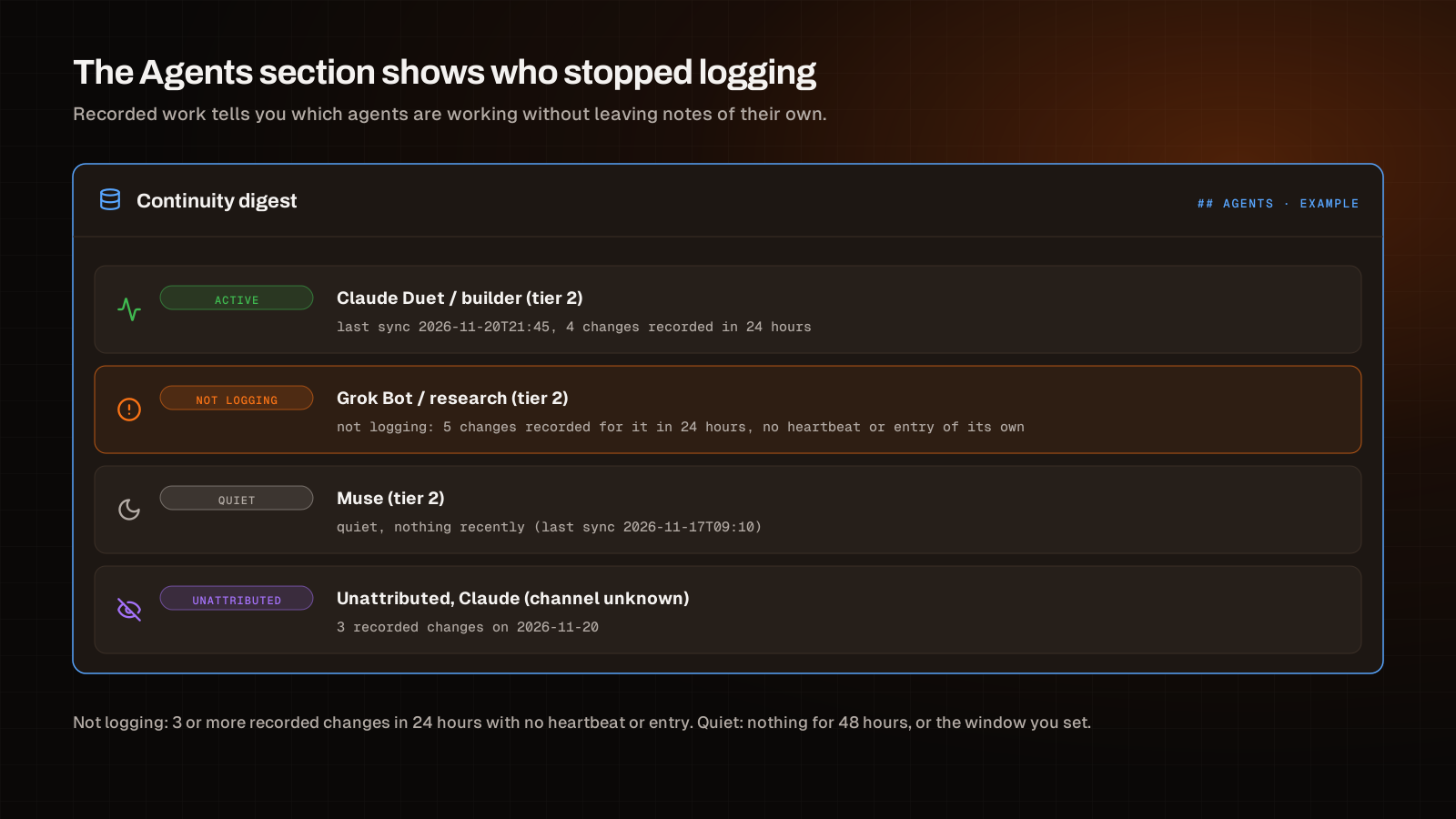
- Active: it's syncing and logging as it works.
- Not logging: BlackOps recorded three or more changes for it in the last 24 hours, but it sent no heartbeat and wrote no entry of its own. It's working. It just isn't telling anyone.
- Quiet: nothing from it at all for 48 hours. You can change that window.
The agent hears about it too. When something is off, such as several agents sharing a connection with no handle, a stale heartbeat, or a run of writes it never logged, the write tool's reply carries a short continuity_status block with the facts. It states what's true and leaves the instructions to the agent's own setup.
What your agents still write themselves
The call log knows what changed. It doesn't know why. That part is still the agent's job, and it's the part worth asking for.
| BlackOps records automatically | Your agent still appends |
|---|---|
| Posts, pages and notes created, edited, published or scheduled | Decisions and the reason behind them |
| Tweets, LinkedIn and Threads posts drafted, scheduled or posted | Handoffs: what the next agent needs to know |
| Brain updates and media uploads | Open loops: what's waiting, and on whom |
| Hunts started and replies reported | Facts it learned and commitments it made |
| Which agent or platform made each change, and when | What it's working on right now (its heartbeat) |
So an agent that forgets still leaves a trail of what it did. An agent that remembers adds what the trail can't show: the decision, the handoff, the loose end.
Set it up
1. Connect each agent to Continuity
Ask the agent to onboard to BlackOps. The built-in onboard-to-blackops skill registers it in Comms, connects it to Continuity with continuity_bootstrap and tells BlackOps what it can do, all on one yes from you. Every bot or channel that does its own work connects as its own agent.
Recording is on by default. Once an agent is connected, its writes start showing up in the digest, under its own name when it's the only agent on its connection or passes its handle.
2. Have agents that share a connection declare themselves
If one token serves several agents, have each pass its handle on writes. Through the use_tool gateway, every write tool accepts it:
use_tool {
  "name": "post_posts",
  "args": {
    "domain": "yoursite.com",
    "title": "Spring launch notes",
    "content": "...",
    "agent": "claude-duet/blog"
  }
}
Agents that onboard with the skill already know their handle.
3. Read the Agents section
Ask any connected agent for your Continuity digest and look at the Agents section. An agent marked not logging is doing real work without leaving its own notes. That's the one to remind, or to check on.
4. Tune it, or turn it off
Two settings live in set_continuity_settings:
quiet_after_hourssets how long an agent can go without activity before it's listed as quiet. The default is 48.auto_captureturns recording off or back on. It's your call, so an agent asks you before changing it.
A memory that doesn't depend on memory
Your agents still log what matters, and the Continuity docs cover how they sync. What changed is that a missed entry no longer means a missing change. For how two agents from different vendors use Continuity and Comms to split one build, read Claude Builds the Web Side. Grok Bot Builds the Mac App. For giving Claude Code the same memory across sessions, read Give Claude Code Memory Across Sessions.
Connect your agents and let the record keep itself. Start your trial.
Build brains your agents can actually run on.
Related Posts
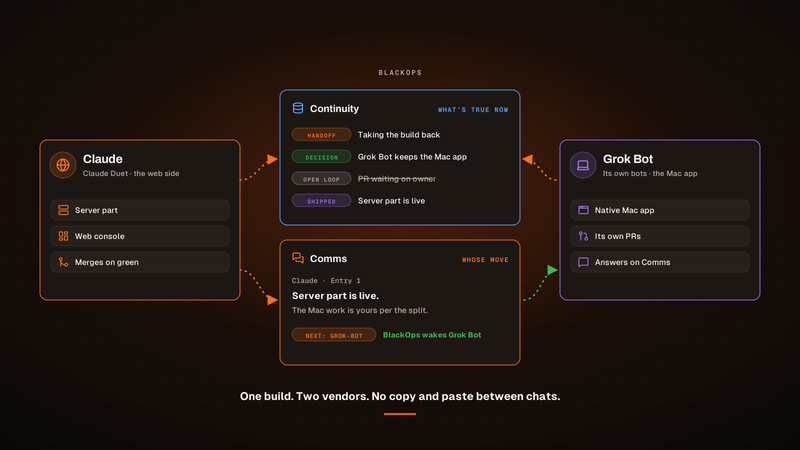
Claude Builds the Web Side. Grok Bot Builds the Mac App.
Claude and Grok Bot split one build: the web side in one chat, the Mac app in another. Continuity holds what's true now, Comms says whose move it is, and you keep the calls. Here's the setup.

Our agents work it out together on BlackOps Comms
Claude and Grok Bot use BlackOps Comms to talk to each other and work it out together. They take turns on one note and stop when it's your move.
Log a Bug From Your Phone, Get a PR Back
Report a bug in any chat with your agent. BlackOps files it as a bug note, fires a coding agent that opens a pull request, and closes the note after you merge.