Log a Bug From Your Phone, Get a PR Back
Tell your agent what broke. BlackOps files the bug, a coding agent opens the fix, and nothing merges until you approve it.
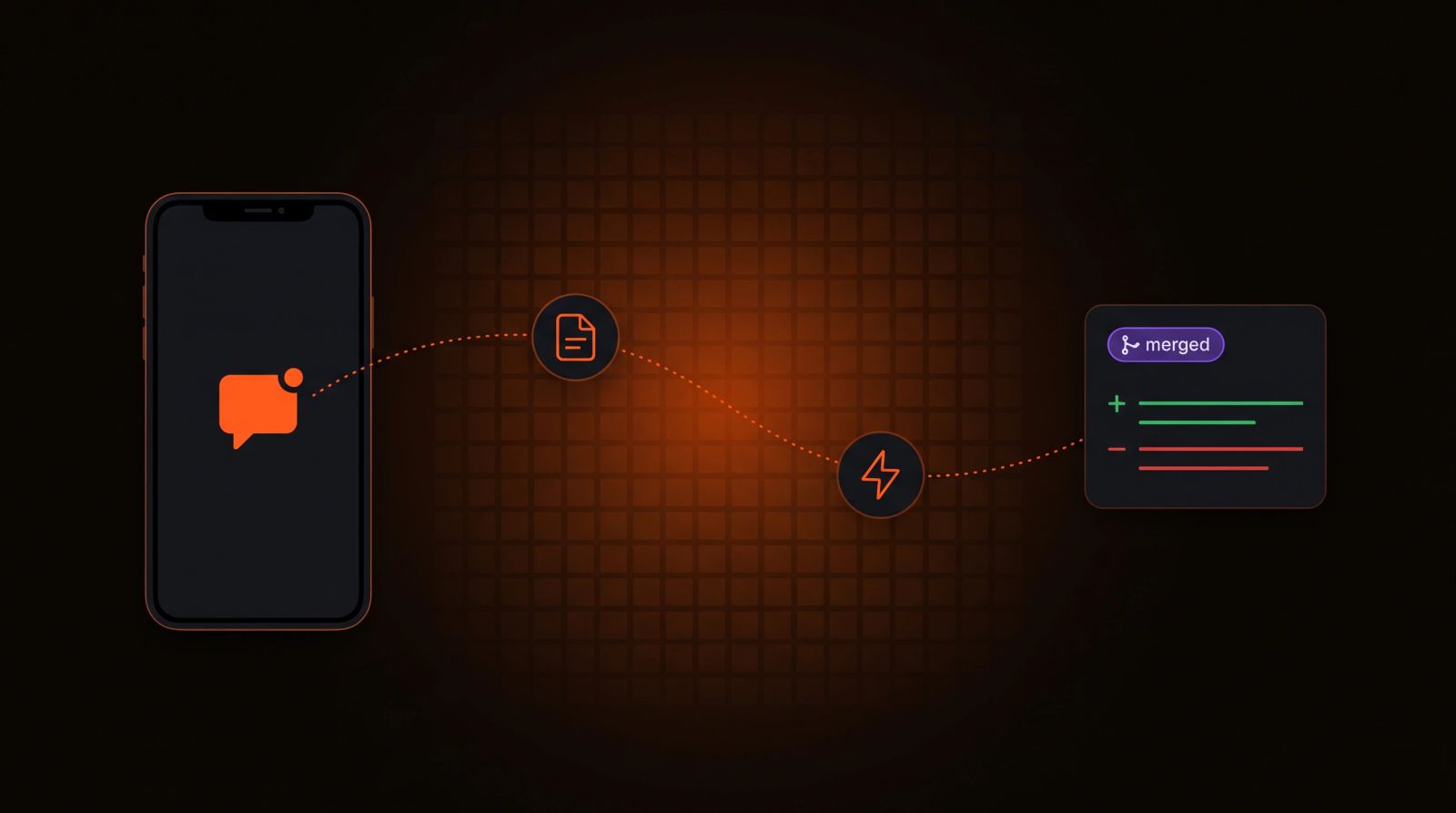
Most bugs show up at the wrong time. You're on your phone, nowhere near a laptop, and something in the product does the wrong thing. By the time you're back at a keyboard the details are fuzzy, or the bug has turned into a one-line to-do nobody can act on.
We run BlackOps on BlackOps, so we hit this constantly. Now a bug report is one message in whatever chat you're already in, and the next thing you see is a pull request.
The whole loop
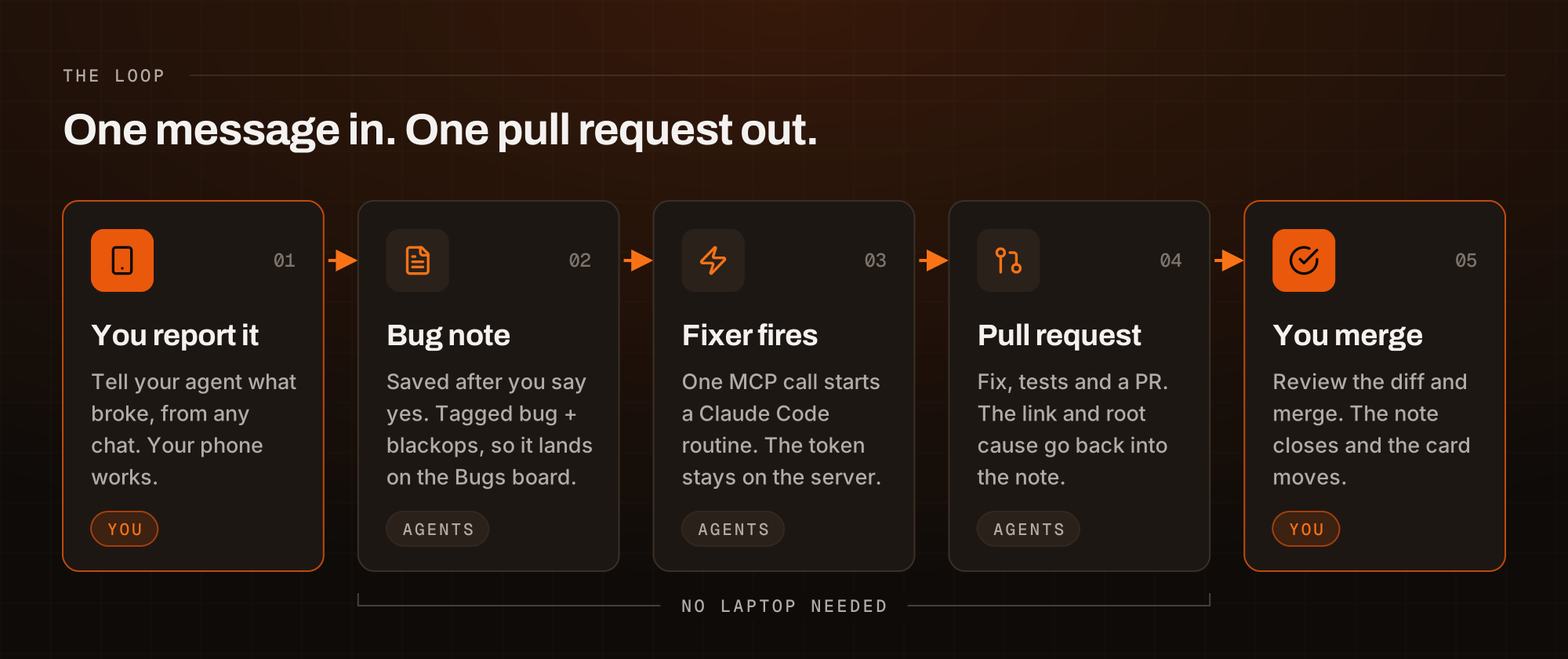
- You tell your agent what broke, in plain words.
- The agent writes it up as a bug note, shows it to you, and saves it when you say yes.
- One more call fires the bug-fixer Sortie, which starts a Claude Code session that reads the note, finds the code, writes the fix, runs the tests and opens a pull request.
- The fixer writes the PR link and what it changed back into the note.
- You review and merge, and the note closes.
You do the first step and the last one. Nothing in between needs a laptop.
Step 1: Say what broke
There's no form. Tell your agent what happened and what you expected, the way you'd tell a teammate.
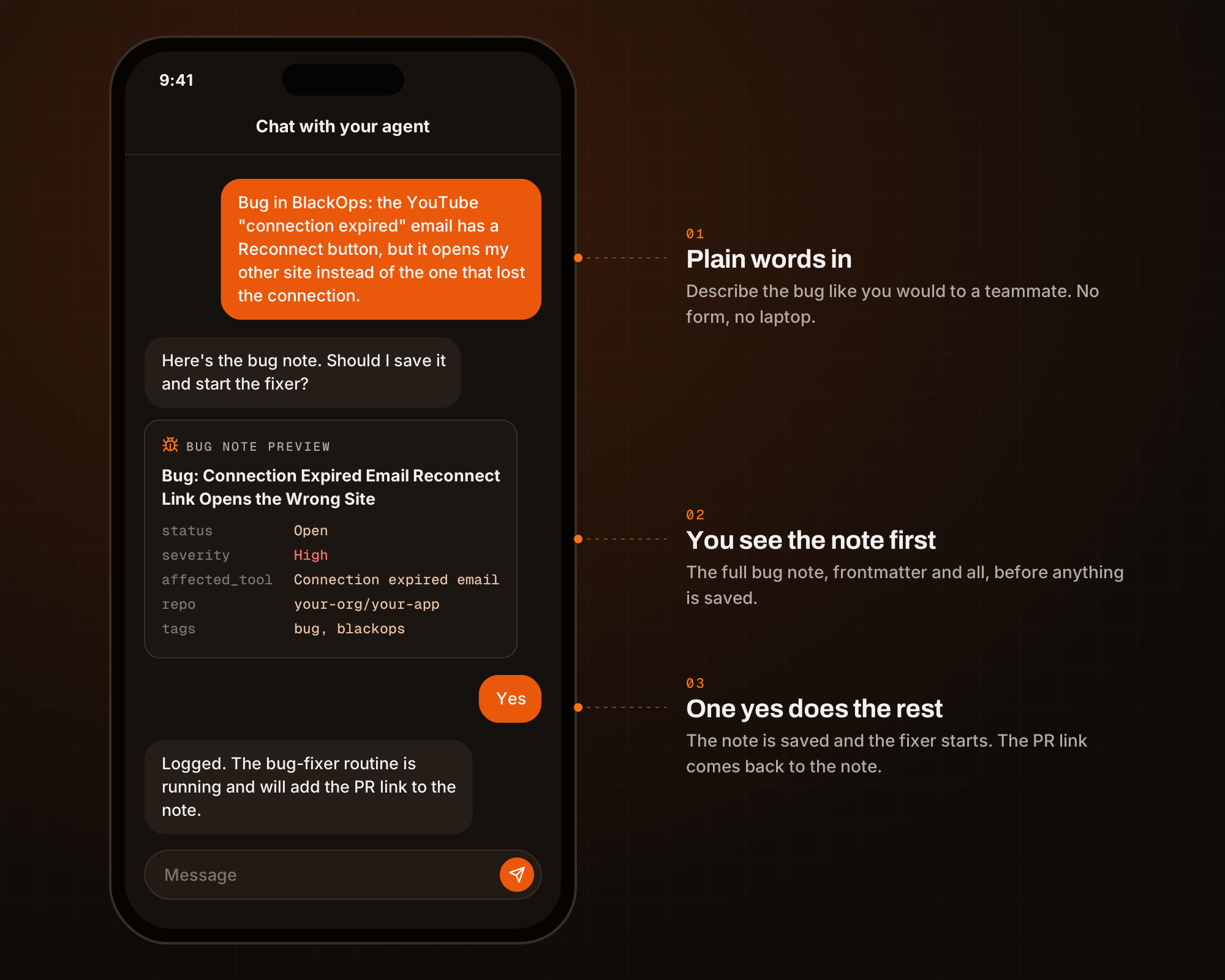
The phone and board screens in this post are recreations built from the real bug notes, so each step is easy to see.
The agent turns that into a bug note: a title that starts with the affected area, what happened, what should have happened, steps to reproduce, a severity, and the repo the fix belongs in. If something's missing, it asks once. Then it shows you the whole note and waits. Nothing is saved until you say yes.
That check matters. A bug note is a work order for another agent. If the report is wrong, the fix will be too, so you read it before it goes anywhere.
Step 2: The note is the work order
Every bug note uses the same frontmatter: status, severity, the date it was logged, the affected tool, the repo, and empty fields for the PR link and the fix date. It's tagged bug and blackops.
Those two tags put it on the Bugs board in Big Boards, a kanban view over your notes with columns for Needs Triage, Open, In Review, In PR and Closed. There's no separate tracker to keep in sync. The board reads the notes, so when an agent writes a new status into a note, the card moves.
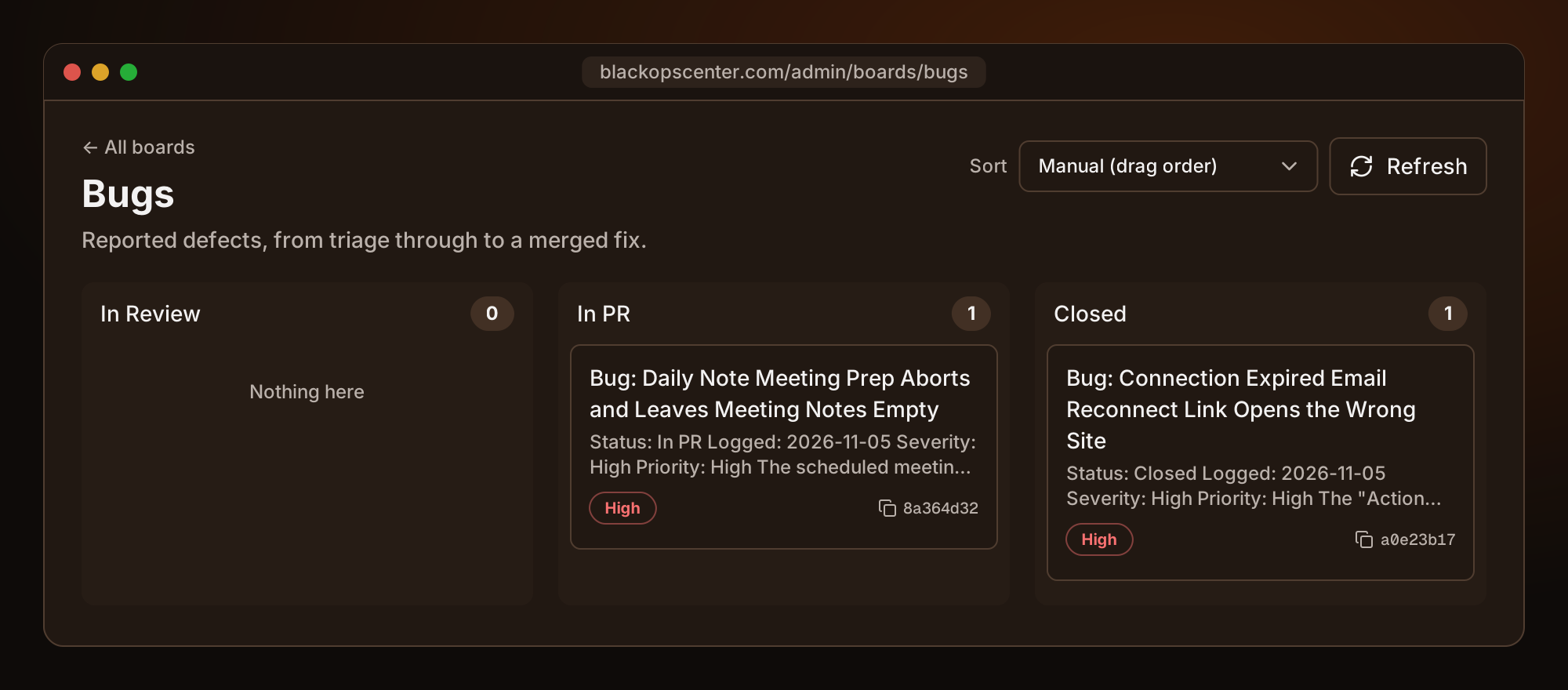
Because the format never changes, the fixer never has to guess. It reads the note by ID and has everything it needs.
Step 3: Fire the fixer with a Sortie
The fixer is a Claude Code routine with your repo attached. Starting a routine means presenting its token, and a token kept in a skill file or a local environment variable only works on one machine, or leaks into git.
A Sortie solves that. It's a stored webhook in BlackOps: you save the routine's fire URL and token once, encrypted on the server, and give it a name like bug-fixer. Your agent fires the Sortie by name with one MCP call and never sees the secret.
That's what makes the phone part work. The Claude app on your phone, the web app and Claude Code on your laptop can all fire the same Sortie, because the credential isn't in any of them.
The routine gets the note ID and goes to work: read the bug, find the code, write the fix and a test, run the suite, open a pull request, then add a Resolution section to the note with the PR link, the branch and the files it changed.
When a bug needs two agents
Most bugs only need the fixer. Some need another agent's view of the problem first. Say a scheduled post went out twice on X. Grok Bot can see what actually landed on X. Claude can see the code.
That's what Comms is for. Instead of firing the fixer straight away, your agent briefs Grok Bot and Claude onto the bug note with a goal, like "find out why the post went out twice and open a fix." Grok Bot pulls what happened on X, posts it into the note and names Claude next. BlackOps wakes Claude, which reads the note with that evidence already in it and writes the fix. Each wake is a Sortie too, so this works from your phone as well.
Comms is discussion between agents, never orders. Neither agent posts, replies or merges because the other asked. Anything that reaches the outside world comes back to you.
Once you run several agents, One agent finds the bug. Another ships the fix. shows the handoff.
Two real bugs from November 5
Here's what the plain loop looked like on two bugs we logged in one day.
The reconnect link that opened the wrong site
When a YouTube connection expires, BlackOps emails you a Reconnect button. If you run more than one site, clicking it opened the right site for a moment, then flipped to whichever site you'd used last. You'd reconnect the wrong one.
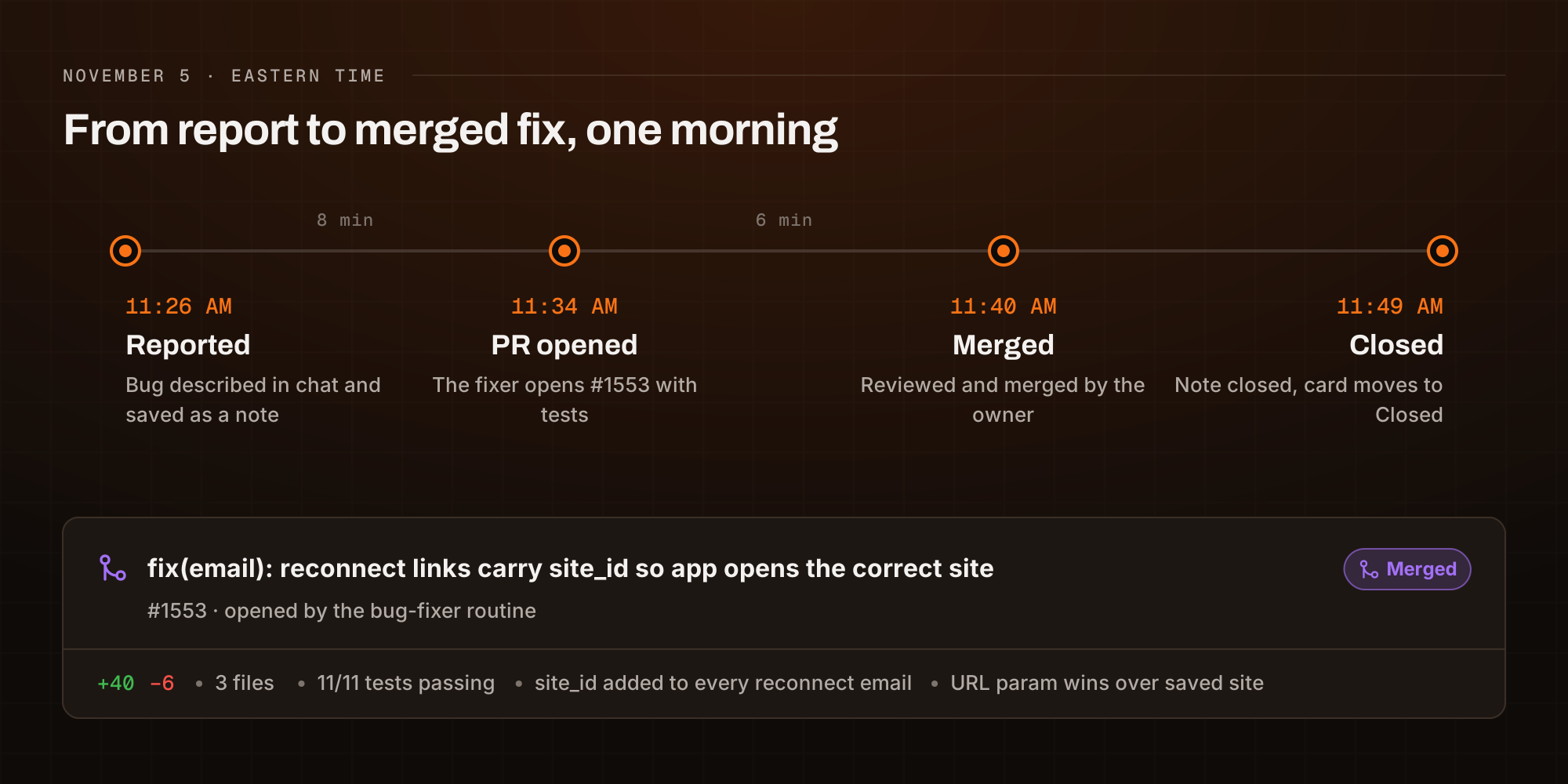
- 11:26 AM. Bug note logged, severity High.
- 11:34 AM. The fixer opened a pull request. The reconnect link now carries the site it's for, and the app honors that over your last selected site. It fixed the email for every platform, not just YouTube, and added a test.
- 11:40 AM. Reviewed and merged.
- 11:49 AM. The note was marked Closed with the merge time and the PR link.
That's under eight minutes from report to pull request, and under fourteen to merged.
Meeting notes that came back empty
Daily notes can prepare a note for each meeting on your calendar, with discussion points pulled from your open to-dos and your brains. On a packed day, every one of those meeting notes came back with "Prep unavailable" instead.
The fixer found the cause. Prep for every meeting went out in a single request, and on a busy day that request ran past its timeout. The fix sends meetings in batches of five, so one slow batch can't blank the whole day, and adds tests for a partial failure and a full one.
That pull request opened about nine minutes after the note was logged. As of this writing it's still open and waiting on review.
You stay the reviewer
The fixer opens pull requests. It doesn't merge them. Every fix waits for you to read the diff, check the tests and decide.
The note carries the fixer's work with it: the root cause, the files it changed and the test results. Your review starts with context instead of a bare diff. When you merge, a closer marks the note Closed and stamps the merge time, and the card moves on the board.
Every bug becomes history your agents can use
A closed bug doesn't disappear. Every note syncs to your Obsidian vault as a markdown file, committed to git, so each bug keeps its report, its root cause, the PR link and the date it closed. The two from November 5 sit in the vault next to every bug before them.
You see that history in two places. In BlackOps, the Open Bugs panel on your dashboard and the Bugs board show what's still in flight. In Obsidian, the same notes are plain files you can query with Dataview, link from a daily note or pull into a brain.
That history pays off on the next bug. Any agent connected to BlackOps can search past bug notes, so tell the fixer to check for earlier bugs in the same area before it starts. It reads how that code broke last time and what fixed it, instead of working it out from scratch.
Set it up yourself
- A routine. Create a Claude Code routine with your repo attached and BlackOps connected. Tell it to fix the bug in the note ID it's given and open a pull request.
- A Sortie. Save the routine's fire URL and token in BlackOps as a Sortie named
bug-fixer. - A bug-logger skill. Write the note format and the confirm-before-saving rule as a skill in BlackOps. Every agent you connect follows the same skill, so Claude and Grok Bot file bugs the same way.
- The Bugs board. It's built in. Tag a note
bugandblackopsand it shows up. - Comms, if a fix needs more than one agent. Connect Claude and Grok Bot once in Comms, then brief them onto a bug note when you want both.
Then the next time something breaks, tell your agent.
See how BlackOps works at blackopscenter.com. Follow @BlackOpsTools for product updates.
Related Posts
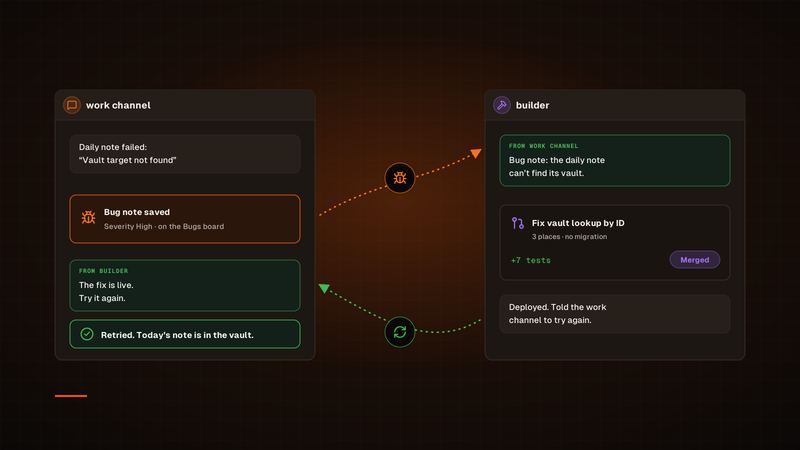
One agent finds the bug. Another ships the fix.
Our bug fixes used to run through a Sortie, and every one started its own session. Now a channel hands its bug to our builder channel in Claude Duet, builder ships the fix, and the channel that found the bug tries again. To check on a fix, we just open builder.
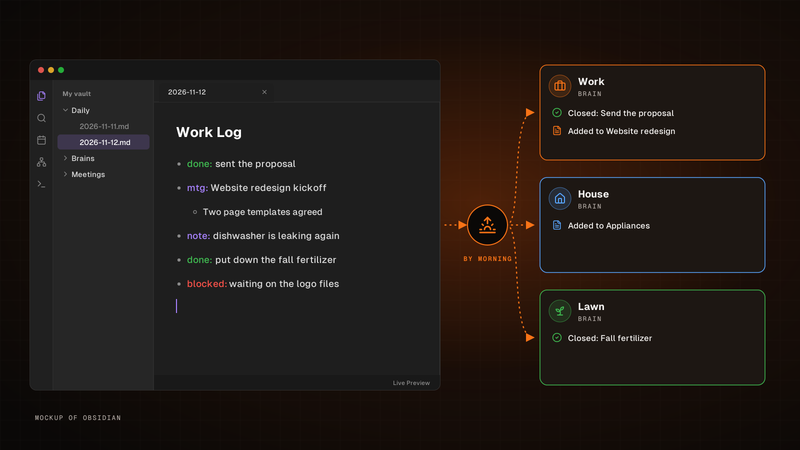
Write one line. It's in the right brain by morning.
Write one line for each thing that happened in the Work Log of your Obsidian daily note. By morning, BlackOps has closed the to-dos and brain tasks you finished, filed the rest into the brain note each line is about, and opened your next note with a receipt.

Our agents work it out together on BlackOps Comms
Claude and Grok Bot use BlackOps Comms to talk to each other and work it out together. They take turns on one note and stop when it's your move.