Keep a Brain Current
Set up brain watches and work the Triage lane, in the app or from your AI assistant, so each brain keeps itself current with your approval.
A brain is only useful if it knows what changed this week. You should not have to go find that yourself. A watch looks for new material on a schedule. Anything that matches lands in the brain's Triage lane. You promote what is worth keeping and dismiss the rest. Nothing joins the brain without your approval.
This guide sets that up end to end. Every step works two ways: in the app, or by asking your AI assistant over MCP.
Pick a Brain and Give It a Clear Description
Watches score what they find against the brain itself: its description, its aliases and the notes it already holds. A specific description gives you sharper results than a long keyword list.
- In the app: open Brain in the sidebar and choose a brain. Its card shows a "to triage" count and Triage and Watches buttons.
- Over MCP: ask your assistant to
list_brains, thenget_brainfor the one you want.get_brainalso reports the brain's watches and how many items are waiting in Triage.
Add a Watch
There are two kinds of watch.
- Keyword: searches Hacker News, Reddit and YouTube for your keywords. You can limit it to certain subreddits and skip YouTube Shorts.
- RSS feed: reads a feed you have already added to BlackOps.
Each watch has a minimum relevance. The default is 0.7. Anything that scores lower is dropped before it reaches you. Watches run about every six hours.
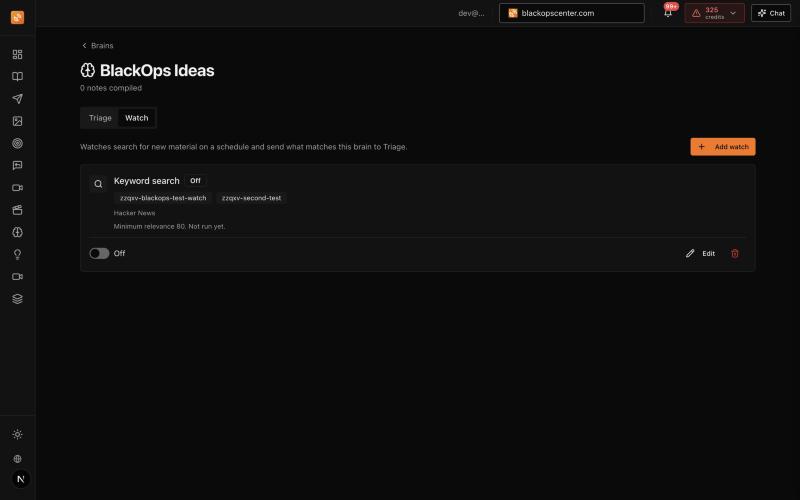
In the app: open the brain and choose the Watch tab, then Add watch. Pick the type, enter keywords or a feed, and set the minimum relevance. Each watch shows when it last ran and how many items it sent to Triage. You can edit it, switch it off or delete it from the same row.
Over MCP: ask your assistant in plain words, for example "watch Hacker News and Reddit for new releases of the tools in my AI Toolbox brain." It calls:
create_brain_watch({ brain_id: "<uuid>", source_type: "keyword", keywords: ["release", "changelog"] })
get_brain_watches({ brain_id: "<uuid>" })
update_brain_watch({ brain_id: "<uuid>", watch_id: "<uuid>", min_relevance: 0.6 })
The app and MCP read and write the same watches. A change in one shows up in the other.
Work the Triage Lane
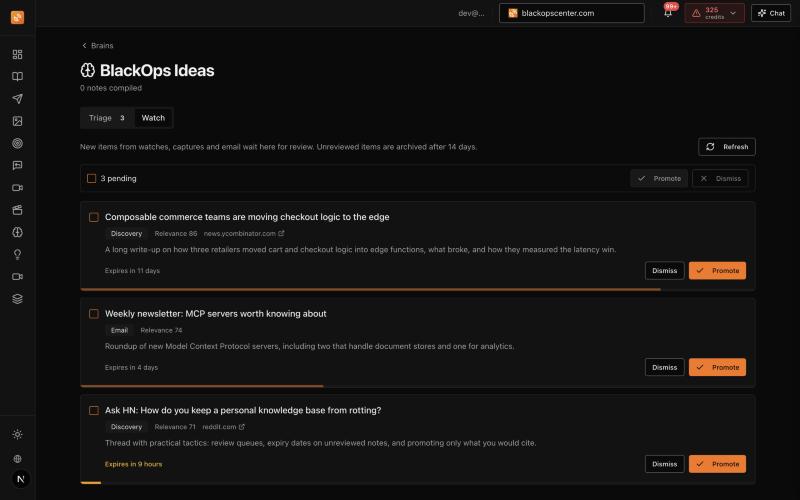
Every item a watch finds waits in the brain's Triage lane with its source, link, relevance score and a short excerpt. You decide what stays.
In the app: open the brain's Triage tab. Promote or dismiss one item with its own buttons, or tick several and use Promote or Dismiss at the top.
Over MCP: ask your assistant "what is waiting in triage for my Product brain?" It calls:
list_triage({ brain_id: "<uuid>" })
promote_triage_item({ note_id: "<uuid>", edits: { title: "Cleaner title" } })
dismiss_triage_item({ note_id: "<uuid>", reason: "not relevant" })
A promoted item joins the brain's compile. For a brain stored in BlackOps that happens right away, so your assistant can use it in the same session. A dismissed item is archived. An item you never get to expires after 14 days by default. Change that per brain with patch_brain and triage_expiry_days.
Ideas for Watches
Watches are not only for content research. Anything you keep track of can keep itself current.
- A purchase you are weighing. A "New laptop" brain with a keyword watch on the models you are comparing. Reviews and price threads land in Triage. When you are ready to decide, ask the brain what you learned.
- Tool releases. A watch on the RSS feeds of the tools you depend on. Breaking changes reach you before they reach your build.
- Competitor moves. A keyword watch on competitor names in the communities you care about. Launches and pricing changes queue up for review.
- Content research. A watch on your core topics, so the material you write from is always this week's, not last quarter's.
Related
- Brain Watches: watch types, scoring details and every MCP field.
- Brain Triage Lane: lineage, batch tools and how the compile treats each state.
- Brain Ingest: add one link, article or transcript to a brain yourself.